realtime-calib v0.1.0 — the first release is out

realtime-calib v0.1.0 is out — the first public release. It's real-time, headless multi-camera calibration you drive from your desktop or tablet: recover every camera's intrinsics and 6-DoF extrinsics in one live pass, then export in the convention your target project actually uses.
The short version
If you set up rigs of USB cameras — for motion capture, robotics, volumetric capture or photogrammetry — calibration is the quiet first step you can't skip. realtime-calib does it live, in one pass, on the machine the cameras are plugged into, and lets you drive the whole thing from a browser on a laptop or tablet in landscape. (The longer story of why I built it is here.)
What's in v0.1.0
- One pass, live. Capture, board detection, quality feedback and the solve happen in a single flow — what you see is what gets calibrated, no pre-recording.
- Intrinsics and extrinsics. Focal length and lens distortion per camera, plus each camera's position and orientation in one shared frame, with a live 3D review before you commit.
- Headless, browser-driven. The service runs in Docker on the camera host — no desktop on that machine — and you drive it from a laptop or tablet on the network.
- Local, private, CPU-only. No cloud, no GPU; streams never leave your network.
- Exports that fit. Caliscope-compatible TOML, or engine-ready JSON with the correct axes and handedness for Unity, Unreal, Blender, three.js and ROS.
Try it in five minutes
git clone https://github.com/hans-brgs/realtime-calib
cd realtime-calib
docker compose up --build
# open https://localhost  ·  from a tablet: https://<HOST_IP>
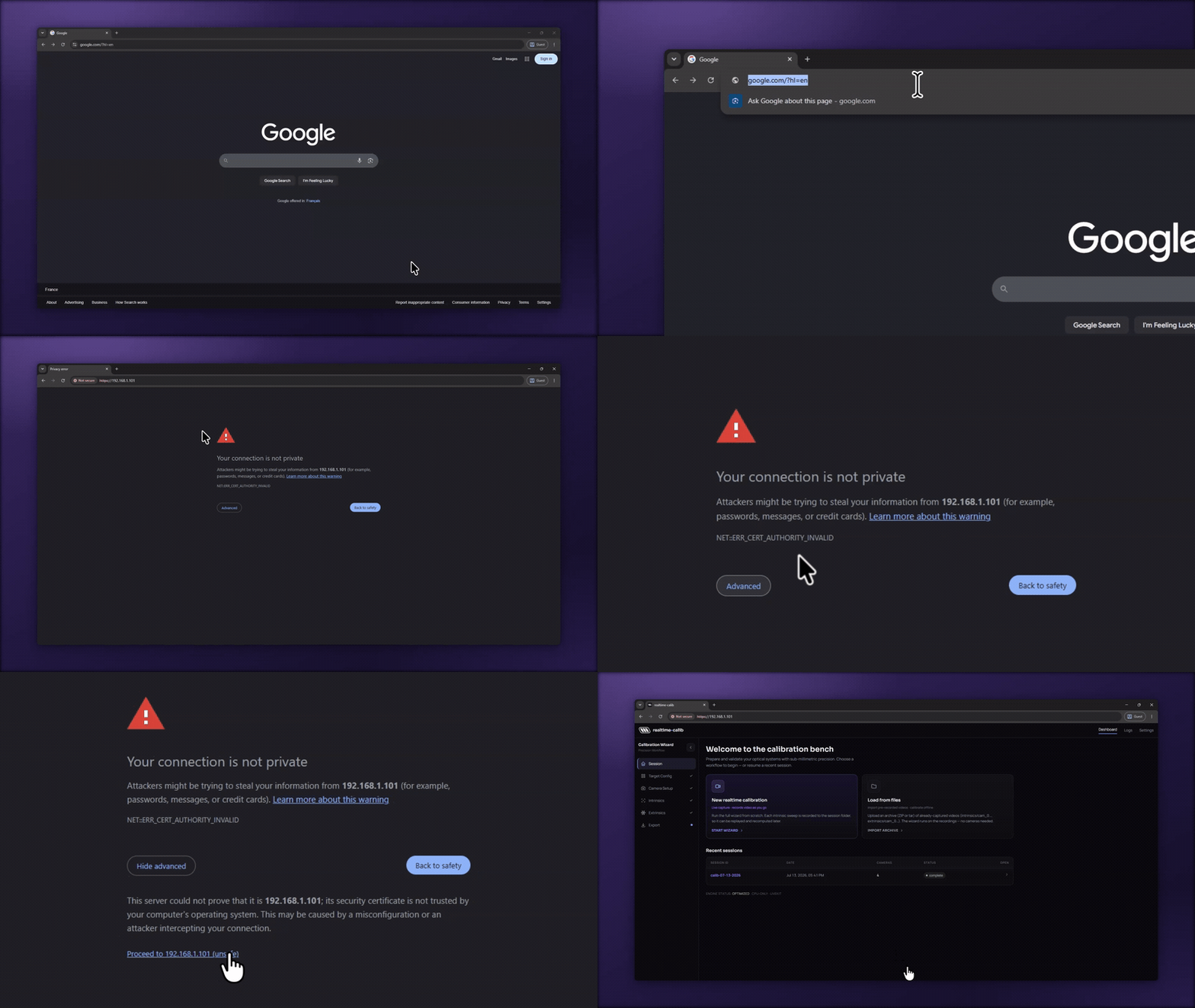
Opening the app from a tablet the first time, the browser warns "Your
connection is not private" (NET::ERR_CERT_AUTHORITY_INVALID). That's
expected: the stack serves HTTPS with a local mkcert certificate your tablet
doesn't know yet — the connection is still encrypted and stays on your network.
Tap Advanced → Proceed (Chrome/Android) or Show Details → visit this
website (Safari/iOS) to continue. Full steps in the
getting-started guide.
Then follow the getting-started guide. If you already use Caliscope, the TOML output keeps its semantics — here's a side-by-side comparison.
This is early — that's the point
v0.1.0 works end to end, but it's a 0.x release: the config and export formats may still move before 1.0. It runs on your laptop or tablet (landscape) today, with phone and portrait support coming soon — on a desktop or landscape tablet, the full flow works end to end. What I want most right now is people running it on their own rigs and telling me what breaks or what's missing.
Tell me what would make it useful for your setup.
- Inspired by Caliscope, created by Mac Prible.
- I use Claude Code (Opus 4.8) to assist me in writing the code.