Export
Check the calibration, then export it in the convention your target needs.
Pre-export checks
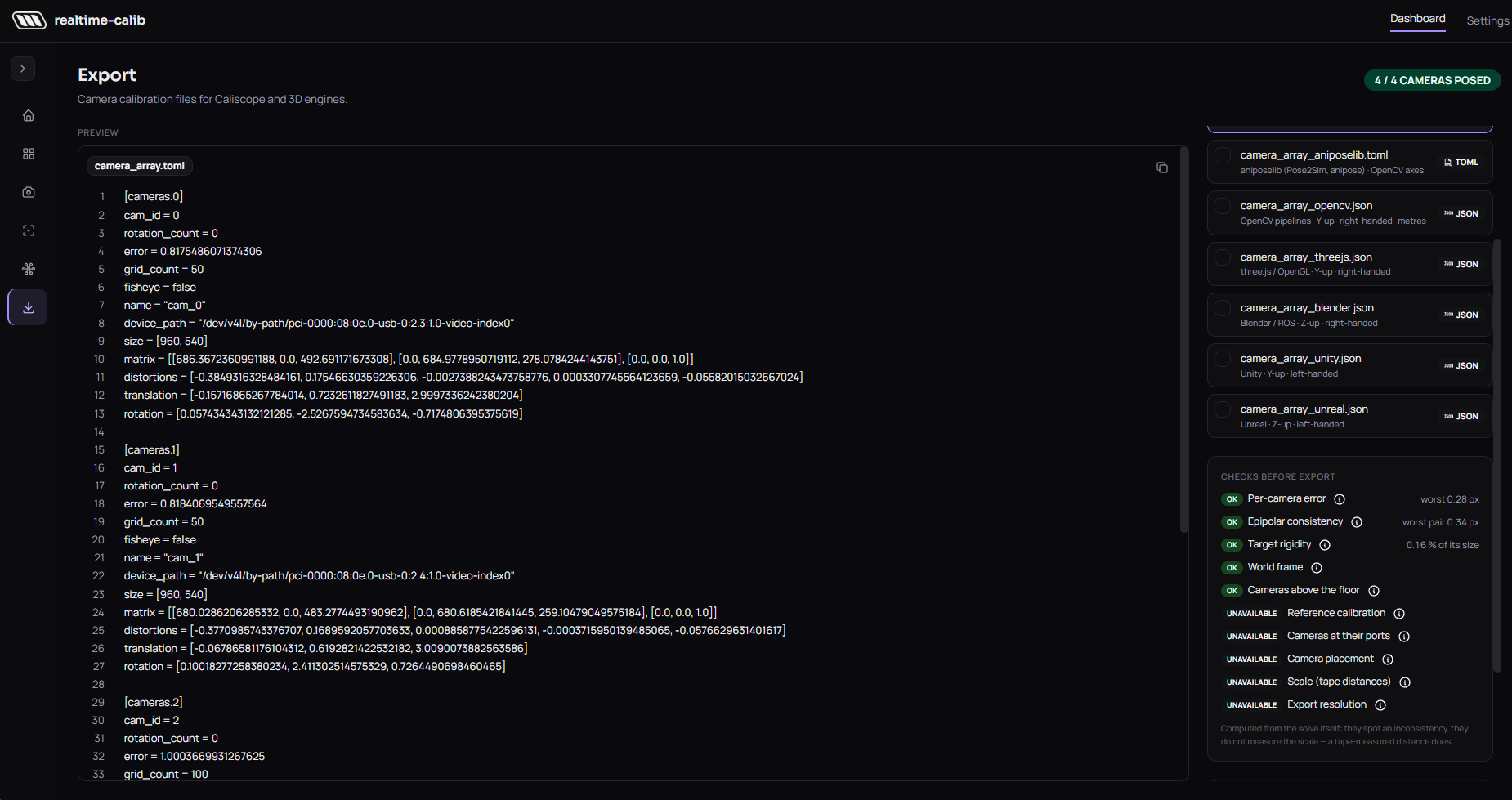
The Export screen shows a Checks before export panel under the targets, recomputed from the solve and also written as checks.json with every export. The checks are read-only and never block an export: they tell you what to look at before handing a calibration over. Each one reads ok, warn, fail, or unavailable (with its cause); tap its info icon for what it proves.
| Check | What it looks at | Bands |
|---|---|---|
| Per-camera error | The worst camera's extrinsic error, output px | ok ≤ 0.6 · warn ≤ 1.2 px |
| Epipolar consistency | Per camera pair, the median symmetric epipolar distance of the solve's observations, output px (needs 20 shared observations) | ok ≤ 0.5 · warn ≤ 1.0 px |
| Target rigidity | The reconstructed target's deviation, as a share of its longest side | ok ≤ 0.25 % · warn ≤ 1 % |
| World frame | The printed face's angle to the up axis: warns if the world is not framed on a target or is tilted, fails if upside down, notes an origin that drifted after a Minimize | |
| Cameras above the floor | Cameras under the level framed target | fails if any |
| Reference calibration | Whether the world still follows the reference calibration you aligned on, and if not, how far off it is |
These checks are internal: computed from the solve, they spot an inconsistency but cannot see an error the whole solve shares. The worst such error is scale: a mis-measured target rescales the whole rig uniformly, and every internal check still passes. A site template adds the external checks.
Site template
A site template describes the room as you know it independently of the solve: which camera goes to which port, where each one sits, and a few distances you measured with a tape. Load it from the Settings window (a JSON file, stored next to the sessions and shared by all of them; load it again once corrected, or remove it). It enables four more checks, all unavailable without a template:
| Check | Fails when |
|---|---|
| Cameras at their ports | A template camera is missing or at another port, i.e. a swapped cable or a changed order (an extra camera warns) |
| Camera placement | A camera breaks its position, pitch or yaw bounds |
| Scale (tape distances) | The scale implied by your tape distances is more than 3σ away from 1 (warns from 2σ); a tape distance that disagrees with the others is named. The scale is reported, never applied |
| Export resolution | A camera does not export at the template's resolution |
{
  "name": "Lab A",
  "resolution": [960, 540],
  "cameras": [
    {
      "device_path": "/dev/v4l/by-path/pci-0000:00:14.0-usb-0:1:1.0-video-index0",
      "port": 0,
      "position_m": { "y": [2.0, 2.25] },
      "pitch_deg": [25, 36],
      "yaw_to_origin_deg_max": 12
    }
  ],
  "distances_m": [
    { "a": "/dev/v4l/by-path/…-usb-0:1:1.0-video-index0", "b": "/dev/v4l/by-path/…-usb-0:2:1.0-video-index0", "m": 3.42, "sigma_m": 0.01 }
  ]
}
- Cameras are named by their
device_path(shown in Camera Setup), each with theport(camera index) it is expected at. - Placement bounds are read in the exported world (Y up, metres):
position_mgives a[min, max]range per axis (yis the height above the floor; an omitted axis is free),pitch_degthe angle below the horizontal,yaw_to_origin_deg_maxhow far the camera may look away from the origin. Leave a margin: a camera installed at 36° may solve at 36.6°. distances_mjoin two cameras' optical centres.sigma_m(default 1 cm) should cover the uncertainty on where the optical centre sits, not only the tape's. Four to six distances make the scale check sensitive to a bias of about half a percent.- The template is validated strictly: a duplicate camera or port, a reversed range, an unknown field or a distance to an unknown camera is refused with the field named, so a typo cannot silently drop a bound.
checks.jsonrecords the template's name and a SHA-256 digest of it, so an export says which template it was checked against.
Targets and units
Export is convention-first: you pick the target software and the length unit (mm or m), and you get one file per selected target. The targets are independent and equal:
- Caliscope:
camera_array.toml, the layout Caliscope itself loads, one[cameras.N]table per camera. Its translations are always in metres, Caliscope's world unit. - aniposelib:
camera_array_aniposelib.toml, the layout Pose2Sim and anipose read, one[cam_N]table per camera, in the selected unit. - OpenCV:
camera_array_opencv.json, a versioned contract for OpenCV pipelines: world → cameraRandt, in a Y-up right-handed world, always in metres, with the world's provenance stated. - Engine JSON:
camera_array_<target>.jsonfor three.js (Y-up, right-handed), Blender / ROS (Z-up, right-handed), Unity (Y-up, left-handed) and Unreal (Z-up, left-handed), with the axis remap and handedness already applied.
The unit selector applies to the aniposelib TOML and the engine JSON files. The export is downloaded as one archive holding only the files of the current selection, plus checks.json. Your choice of targets and unit is saved with the session.
The preview's copy button needs a secure context: it works at http://localhost, not from a tablet on the LAN, where you download the files instead.
→ Reference: Calibration output files